Move to Power BI without paying to rebuild the clutter.
Most Power BI programmes start with a list of every old report and a plan to rebuild the lot. Reperta shows which reports are copies, which are stale and which the business really runs on.
Sound familiar?
"Just move everything across."
The scope is every report on the old platform, because nobody can say which are still used or which are copies.
"The estimate keeps growing."
Every report you open turns out to feed two more. The surprises arrive mid-build.
"Which margin do we build?"
Finance and Sales calculate it differently. Rebuild both and the argument moves into the new tool.
How Reperta helps
- 1
Cut the scope before you start
Find the duplicates, stale reports and forgotten copies, and leave them behind.
- 2
Build in the right order
See what each report relies on, so the foundations are rebuilt first.
- 3
Agree the numbers once
Settle conflicting definitions with their owners before the build, so each number is built once.
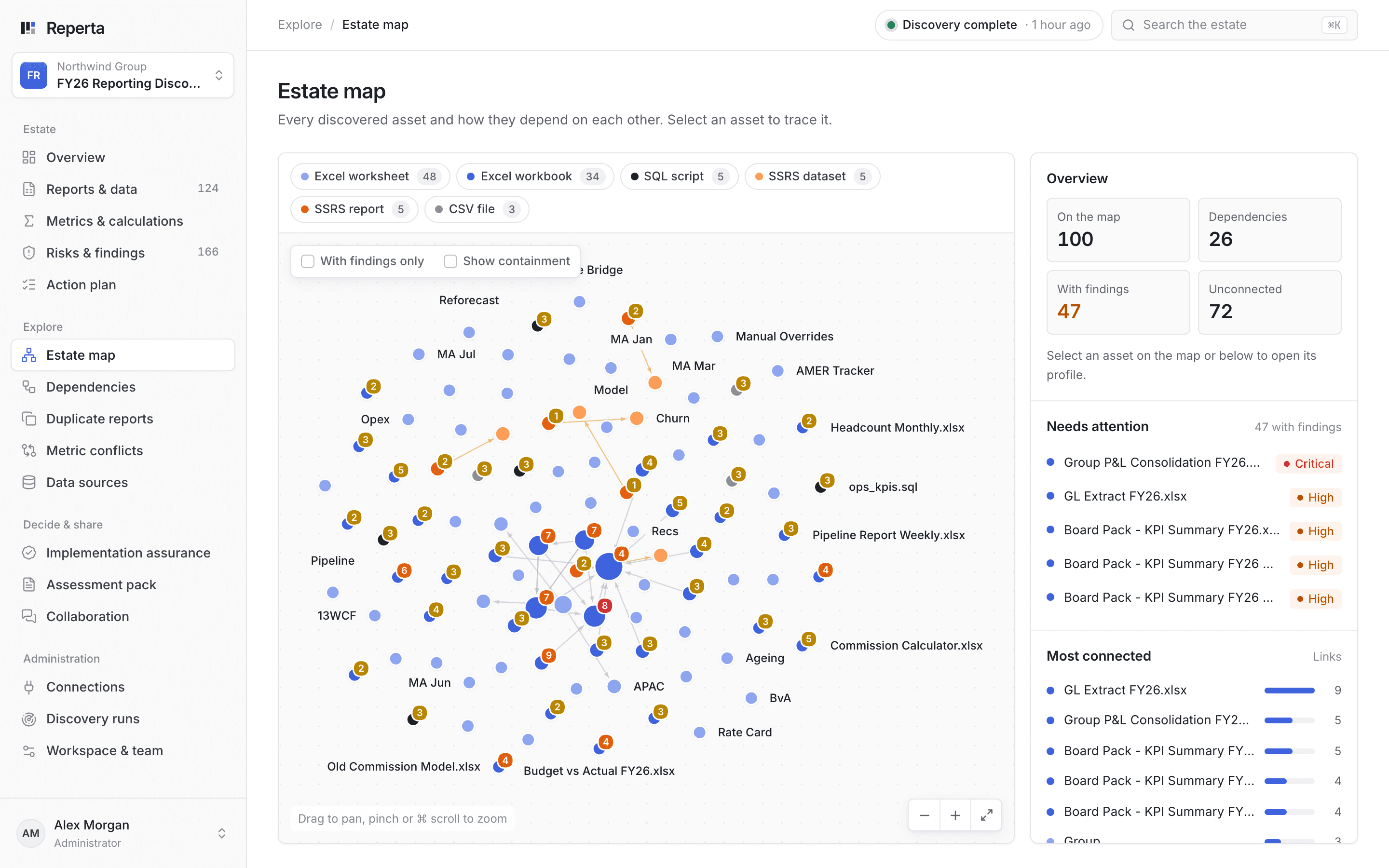
Your reporting on one map. Every report and source in scope, with problem areas marked, so you plan the move with the whole picture.
Northwind: what not to rebuild
Discovery found two copies of the FY26 board pack and 5 assets that looked stale or archived, all candidates to leave behind. Group P&L Consolidation FY26.xlsx, with 4 reports depending on it, went first.
What you get
- A smaller scope, without the copies and stale reports
- A build order based on what really relies on what
- One agreed definition for each number you rebuild
- A decision on every report
- Open questions listed up front, not found mid-build
Questions
We already have a report inventory. Why scan?
An inventory lists what exists. Reperta reads how each report is built, so it finds the copies, conflicting calculations and hidden links a list cannot show.
Does Reperta build the Power BI reports?
Reperta prepares migration work from the agreed scope and definitions. Your team or delivery partner reviews it and controls deployment.
How soon do we see results?
Your first discovery report arrives within a week of agreeing scope and access.
Related guides
The reporting transformation checklist: what to settle before you commit
Eight questions every sponsor should have answered before a reporting transformation is scoped, from what exists and who owns it to what retires and how sign-off works.
Read the guideBefore you rebuild SSRS and Excel reports in Power BI: what to decide first
What a sponsor should ask and decide before SSRS and Excel reporting moves to Power BI, and why a like-for-like rebuild carries old problems into the new platform.
Read the guideOther places teams start
All use cases- Conflicting numbersOne agreed definition for every metric
- AI-built dashboardsFaster dashboards still need agreed numbers
- Ongoing reporting healthStay right as reporting changes
- Dashboard sprawlKnow what you have before you build more
- Spreadsheet reportingFind the workbooks the business runs on
- Fixing known problemsTurn findings into fixes that stick
- ModernisationDecide what to keep, fix, retire or rebuild
- Retiring SSRSSwitch off the old server without surprises
Bring the number nobody can explain.
Book a 30-minute demo. We will show you how Reperta finds what is behind it, fixes it and keeps it right.