Your most important business system might be a spreadsheet.
Finance and operations reporting lives in workbooks called FINAL v2, fed by copy and paste and understood by one person. Reperta finds the few that everything depends on and the copies nobody needs.
Sound familiar?
"Which one is the real version?"
FINAL, FINAL v2 and a copy in someone's own folder. Each has been edited, and nobody is sure which one the board pack reads from.
"Only one person understands that workbook."
A critical file with hard-coded numbers and one owner. When they are on leave, the reporting waits.
"It breaks every time someone moves a folder."
Linked files, manual pastes and email attachments hold the process together, and none of it is written down.
How Reperta helps
- 1
Map the workbooks
See how each workbook calculates its numbers and where its inputs come from.
- 2
Spot the copies and the fragile ones
Duplicates, stale files, manual inputs, fragile links and single owners are flagged against each workbook.
- 3
Decide what stays
Agree which workbook is the source, retire the copies and put a named owner against everything that remains.
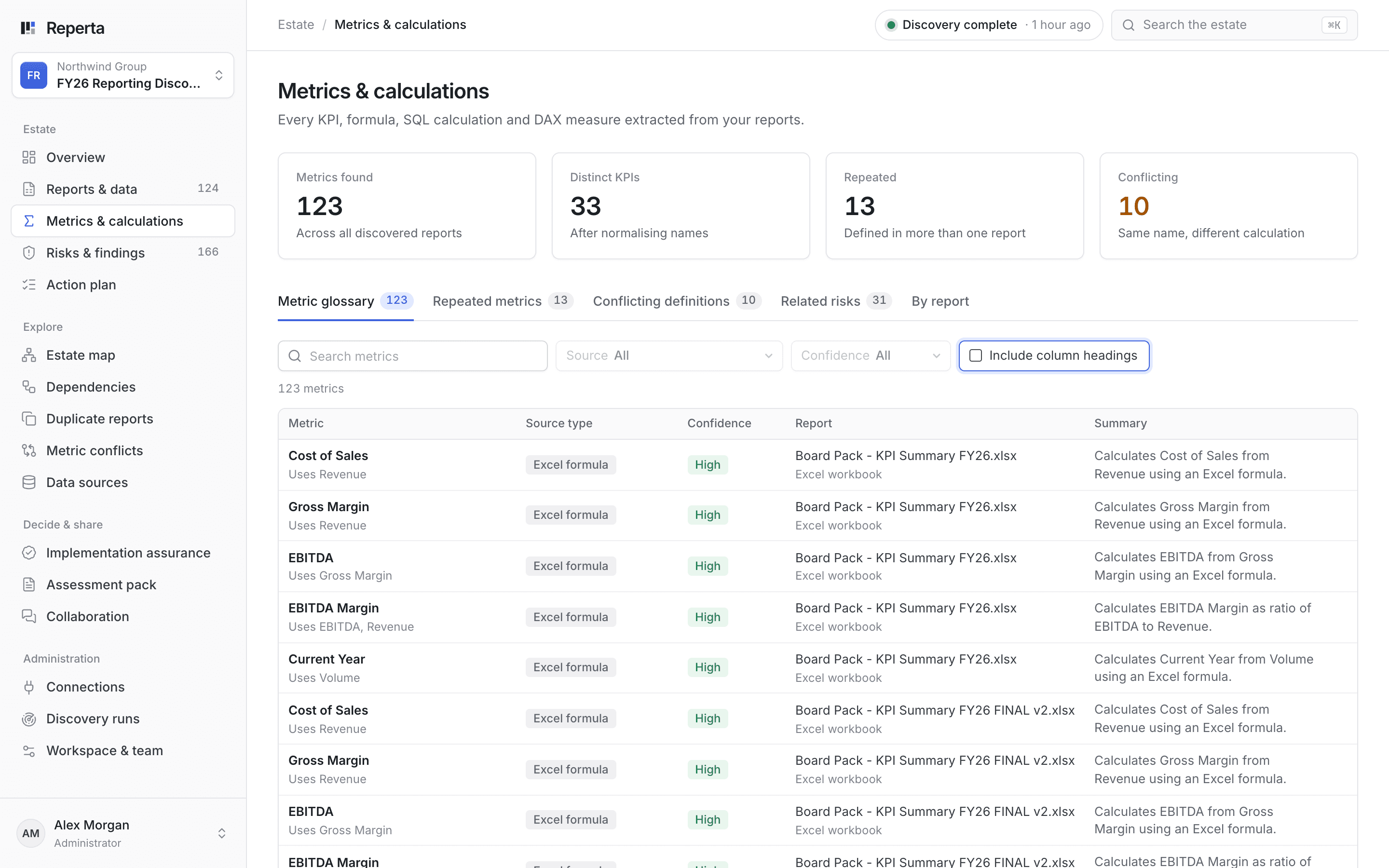
Open the logic inside every workbook. Every formula and measure Reperta finds, traced back to its inputs, with repeated and conflicting metrics counted.
Northwind: two FINALs and almost no owners
Northwind Group runs largely on 34 Excel workbooks. Discovery found two copies of the FY26 board pack and 10 assets relying on manual inputs, fragile file paths or email. Almost nothing had an identifiable owner.
What you get
- One list of the workbooks your reporting depends on
- Copies and stale files flagged for review
- Manual and fragile steps named, file by file
- An owner against each workbook that stays
- A clear starting point if you move to Power BI later
Questions
Our workbooks are scattered across SharePoint. Do we tidy up first?
No. Point Reperta at the sites and folders you use today. Finding the sprawl is the job.
Will you read our financial figures?
Where the agreed work needs it, Reperta reads workbook values as well as formulas and links. Access, processing and retention are agreed with you first, and discovery never edits the workbook.
Is this just telling us to stop using Excel?
No. Plenty of good reporting runs in Excel. The aim is to know which workbooks matter, give them owners and stop maintaining the copies.
Related guides
The reporting transformation checklist: what to settle before you commit
Eight questions every sponsor should have answered before a reporting transformation is scoped, from what exists and who owns it to what retires and how sign-off works.
Read the guideKeep, fix, retire or rebuild: a decision framework for reports
A simple framework for deciding what each report deserves, the evidence to ask for behind every verdict and how to get owners to commit.
Read the guideOther places teams start
All use cases- Conflicting numbersOne agreed definition for every metric
- AI-built dashboardsFaster dashboards still need agreed numbers
- Ongoing reporting healthStay right as reporting changes
- Dashboard sprawlKnow what you have before you build more
- Fixing known problemsTurn findings into fixes that stick
- ModernisationDecide what to keep, fix, retire or rebuild
- Moving to Power BIMove what matters and leave the rest behind
- Retiring SSRSSwitch off the old server without surprises
Bring the number nobody can explain.
Book a 30-minute demo. We will show you how Reperta finds what is behind it, fixes it and keeps it right.