Retire SSRS knowing what still depends on it.
The report server has run quietly for years, and nobody wants to be the one who switches it off. Reperta shows what each report reads, what relies on it and what is no longer used.
Sound familiar?
"Nobody knows who uses half of these."
Reports, scheduled emails and Excel exports have piled up for years. The people who built them have moved on.
"Last time we turned one off, the phone rang."
A report that looked dead was quietly feeding a finance workbook. Nobody found out until quarter end.
"We cannot get a switch-off date signed."
Without evidence of what depends on the server, nobody will put their name to turning it off.
How Reperta helps
- 1
See what each report relies on
Reperta reads every report in scope and shows what it draws on and what relies on it.
- 2
Separate the dead from the critical
Copies, stale reports and single-owner reports are flagged, so you retire the easy ones first.
- 3
Sign off the switch-off
Owners record a decision on each report. Anything still unconfirmed is listed to check before the date.
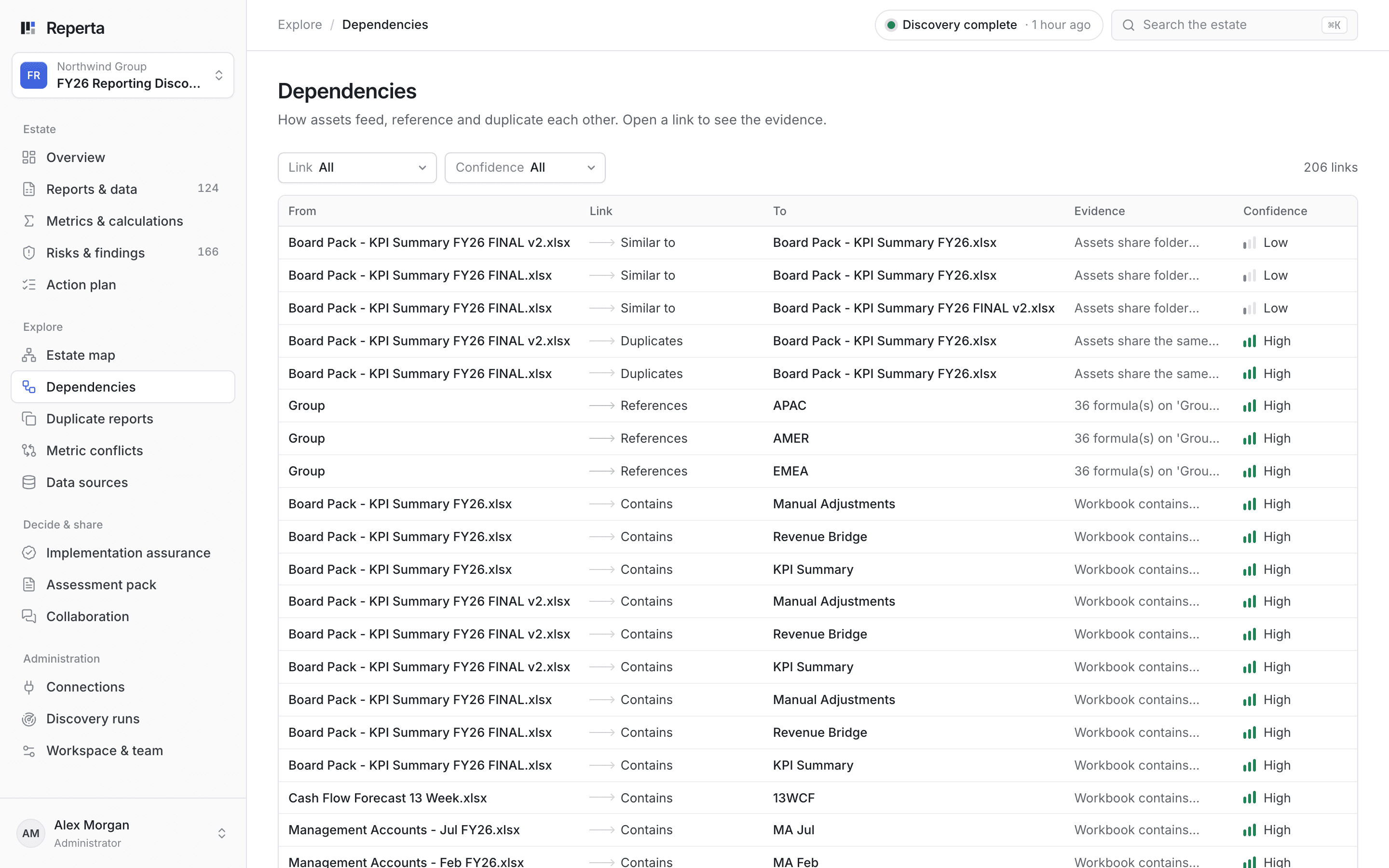
Every dependency, with its evidence. Which reports feed which, and how sure each link is, so the switch-off list is complete.
Northwind: what still relies on the server
Northwind Group has 5 SSRS reports alongside 34 Excel workbooks and 5 SQL scripts. GL Extract FY26.xlsx turned out to be referenced by 9 reports, and 21 of 53 traced connections were confirmed. The rest became the checklist before switch-off.
What you get
- Every SSRS report, with what it draws on
- What relies on what, with open links listed to check
- Stale and duplicate reports for owners to review
- A recorded decision and owner for each report
- Evidence to put behind a decommission date
Questions
Will scanning affect the report server?
Discovery is read-only. Any changes are a separate step that your team reviews and approves.
Can you guarantee nothing breaks when we switch off?
Reperta shows everything it found relying on the server and lists anything it could not confirm, so your team checks those before the date rather than after it.
What about workbooks that rely on SSRS?
Spreadsheets, SharePoint and your databases are covered in the same scan, so links from the report server into workbooks appear in one view.
Related guides
Before you rebuild SSRS and Excel reports in Power BI: what to decide first
What a sponsor should ask and decide before SSRS and Excel reporting moves to Power BI, and why a like-for-like rebuild carries old problems into the new platform.
Read the guideKeep, fix, retire or rebuild: a decision framework for reports
A simple framework for deciding what each report deserves, the evidence to ask for behind every verdict and how to get owners to commit.
Read the guideSSRS end of support: what it means and how to plan the move
SSRS 2022 is the last version of SQL Server Reporting Services. What the support dates mean, your options and how to plan a move without surprises.
Read the guideOther places teams start
All use cases- Conflicting numbersOne agreed definition for every metric
- AI-built dashboardsFaster dashboards still need agreed numbers
- Ongoing reporting healthStay right as reporting changes
- Dashboard sprawlKnow what you have before you build more
- Spreadsheet reportingFind the workbooks the business runs on
- Fixing known problemsTurn findings into fixes that stick
- ModernisationDecide what to keep, fix, retire or rebuild
- Moving to Power BIMove what matters and leave the rest behind
Bring the number nobody can explain.
Book a 30-minute demo. We will show you how Reperta finds what is behind it, fixes it and keeps it right.